
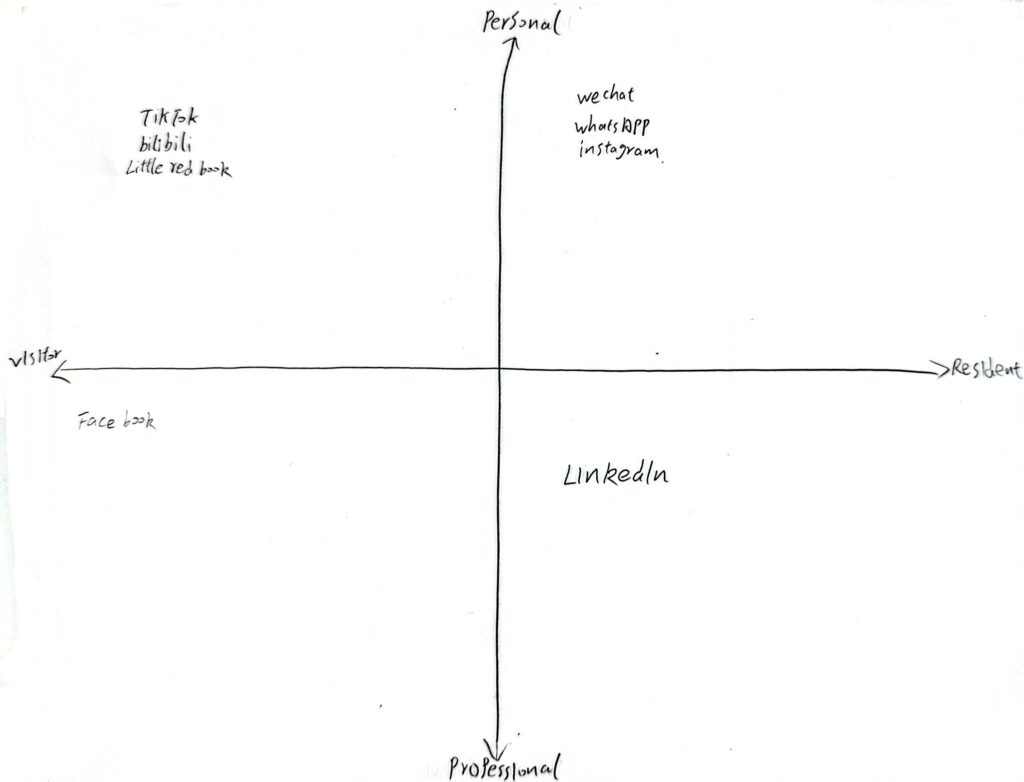
Personal Digital Identity vs Professional Digital Identity

This blog topic has given me a lot of thought. Among the digital platforms I currently use to expand my professional network, LinkedIn stands out as the most useful. Other social media platforms are more for personal use; I don’t use them with a professional mindset, and my posts and daily sharing don’t seem to aim to project a professional image. I believe LinkedIn is a ready-made platform. Its unique existence allows users to showcase their professionalism, such as their resumes and past work experience, when registering an account.

When expanding my professional network, I think resumes, education, and work experience are all factors to consider. We can amplify past challenges and experiences to enhance our expertise in a particular area. I believe educational background, such as specific experiences in our major, is most useful for professional networking. Other potentially influential factors include hobbies and skills.

Regarding employers evaluating my digital identity, I think their reaction will likely be that I enjoy sharing life’s challenges and actively seeking solutions, and I’m willing to use the internet to learn new skills. I believe that in today’s world of advanced technology, not using the internet to learn new content and skills would be a waste of resources. And I’m also someone who loves life and is positive and proactive.
Welcome and Introduction

image showing person walking in pre-painted footprints

Before proceeding with this first blog post, we expect you to consider your privacy preferences carefully and that you have considered the following options:

  1. Do you want to be online vs. offline?
  2. Do you want to use your name (or part thereof) vs. a pseudonym (e.g., West Coast Teacher)?
  3. Do you want to have your blog public vs. private? (Note, you can set individual blog posts private or password protected or have an entire blog set to private)
  4. Have you considered whether you are posting within or outside of Canada? This blog on opened.ca is hosted within Canada. That said, any public blog posts can have its content aggregated/curated onto social networks outside of Canada.

First tasks you might explore with your new blog:

  • Go into its admin panel found by adding /wp-admin at the end of your blog’s URL
  • Add new category or tags to organize your blog posts – found under “Posts” (but do not remove the pre-existing “edci338” category).
  • See if your blog posts are appearing on the course website (you must have the the edci338 category assigned to a post first and have provided your instructor with your blog URL)
  • Add pages, if you like.
  • Include hyperlinks in your posts (select text and click on the link icon in the post toolbar)
  • Embed images or set featured images and embed video in blog posts and pages (can be your own media or that found on the internet, but consider free or creative commons licensed works). To embed a YouTube video, simply paste the URL on its own line.
  • Under Dashboard/Appearance,
    • Select your preferred website theme and customize to your preferences (New title, new header image, etc.)
    • Customize menus & navigation
    • Use widgets to customize blog content and features
  • Delete this starter post (or switch it to draft status if you want to keep it for reference)

Do consider creating categories for each course that you take should you wish to document your learning (or from professional learning activities outside of formal courses). Keep note, however, that you may wish to rename the label of the course category in menus (e.g., as we did where it shows “Social Media & PL” as the label for the “edci338” category menu.  This will enable readers not familiar with university course numbers to understand what to expect in the contents.

Lastly, as always, be aware of the FIPPA as it relates to privacy and share only those names/images that you have consent to use or are otherwise public figures. When in doubt, ask us.

Please also review the resources from our course website for getting started with blogging:

Test Social Media Post

University of Victoria

This post  will appear in a few places:

  1. in the blog feed on the front of your website
  2. in the Learning Design menu on your website. This is because we have applied the “edci338” category to this post and the menu item “Social Media & Personalized Learning” has been created from the category “edci338.” For every post you make for this course, please assign the “edci338” category to it. You are welcome to use this blog for your personal hobbies or for other courses, in which case, you could create additional menu items and categories for them.
  3. if you give permission, your posts categorized “edci338” will be aggregated onto the Blog Feed on the EDCI 338 Course Website.

Feel free to delete this post once you understand this. If you have any questions, please reach out to your instructor.